Object Type Selection - marking menu - Maya script (Python)
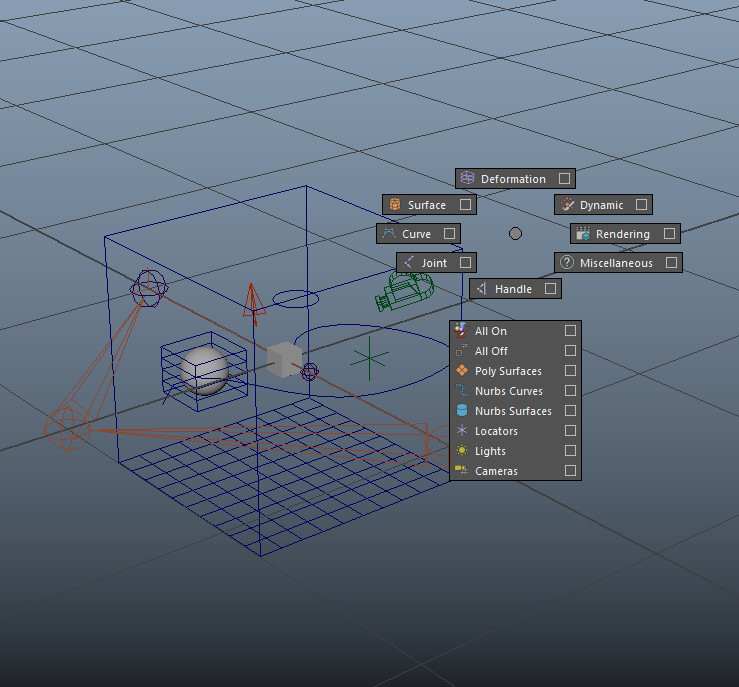
Video demo: https://youtu.be/yH3JxS_hoS8
Installation0. Close Maya.
1. Copy object_selection_marking_menu.py to C:\Users\[your name]\Documents\maya\scripts
2. Copy userSetup.py to C:\Users\[your name]\Documents\maya\[your version of maya]\scripts
3. Open Maya. And use Ctrl + Shift + hold Middle Mouse for the marking menu
Should work with any version of Maya. Inbox me if it doesn't.
cvbtruong@gmail.com or truongcgartist@gmail.com
If you already have userSetup.py file, then add this line to the file (using notepad or similar texting/ programming software):
import maya.cmds as cmds
cmds.evalDeferred("import object_selection_marking_menu;object_selection_marking_menu.markingMenu()")
=========================
If the tool still didn't load (in some old version of Maya). Add this code (Python) to Your Shelf:
import object_selection_marking_menu
object_selection_marking_menu.markingMenu()
Run it once for every time open Maya
=========================
If you want different hotkey (some coding involved):
Find this line in object_selection_marking_menu.py:
menu = cmds.popupMenu(MENU_NAME, mm=1, b=2, aob=1, ctl=1, alt=0, sh=1, p="viewPanes", pmo=1, pmc=self._buildMarkingMenu)
With:
ctl - Ctrl is used or not
sh - Shift is used or not
alt - Alt is used or not
b - is mouse button: 1- left, 2-middle, 3-right
More option for hotkey: https://bindpose.com/custom-hotkey-marking-menu-maya/
=========================
Sometimes, All On is clicked but you can only select few objects, this is because of Priority setting (Window > Preferences > Settings > Selection > Priority). Ctrl + Shift + select more to add them all.
Also, make sure you're using selection tool (Q), when select items. Sometimes, a specific tool is in use, which end up override the selection masking.
- Truong